Leadership
Compliance

Create TEF evidence reports across courses
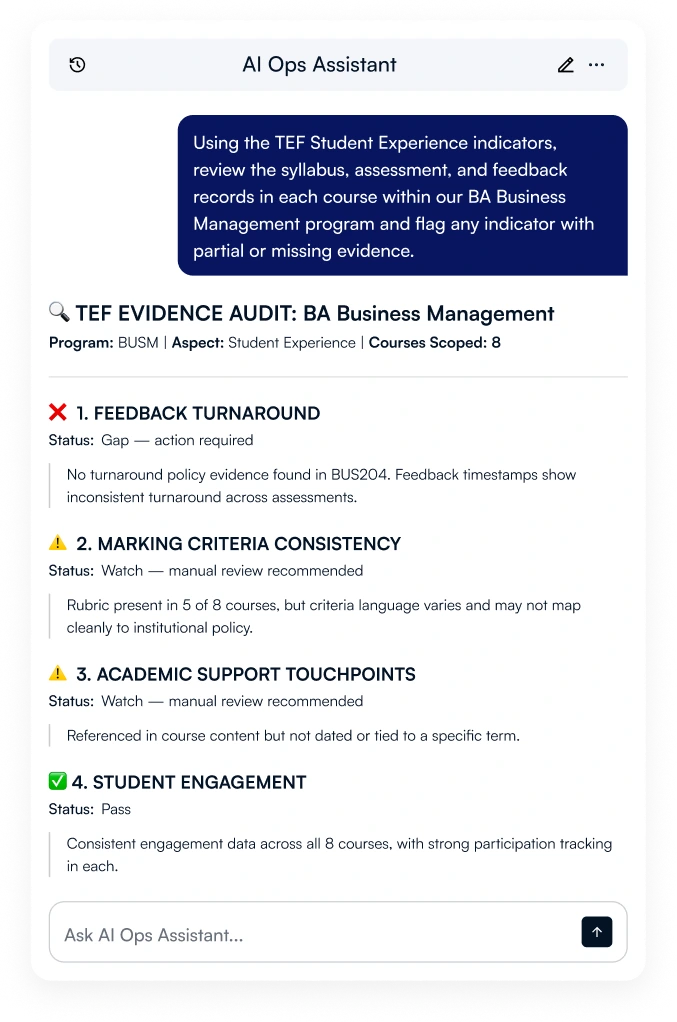
AI Ops Assistant reads only the courses you scope and maps their content against TEF indicators. Scope the program, map the evidence, review the gaps, confirm the report.
LearnWise AI Ops Assistant running a TEF audit inside the LMS

Why
it
matters

01
You get full-portfolio evidence coverage
Checking TEF evidence across a portfolio means opening every syllabus, feedback log, and assessment brief one course at a time. AI Ops Assistant does that across the whole portfolio in one request and returns a structured evidence map.
Time saving
02
Every program gets the same rigor of review
With dozens of programs entering the same submission cycle, manual evidence gathering means depth depends on who has time to chase it. A repeatable, agent-driven process gives every program the same consistent, auditable evidence.
Scaling operations
03
Closing the gaps improves the student experience
TEF Student Experience indicators track things students feel directly: feedback speed, marking consistency, support access. When AI Ops Assistant flags a gap, closing it doesn't just strengthen the submission, it fixes what students actually experience.
Student experience improvement

How to audit courses for TEF with AI

01
Scope: add your standard and define the programs
Upload the TEF standard and your provider submission template to the knowledge base, or paste them into the chat, so the agent audits against your actual requirements and formats output the way your submission needs. If this is a recurring audit, add the most recent evidence report as well, so the agent can track progress and show what has improved since last time.
02
Map: ask for evidence coverage across the courses
Give the agent the programs to include and whether to check Student Experience, Student Outcomes, or both. The agent reads syllabi, assessment and feedback records, and engagement data in each named course and returns a coverage map showing evidence as strong, partial, or missing.
03
Review: drill into a gap or track progress over time
Ask for the evidence behind any indicator, or compare this month's coverage against the last audit to see which gaps have closed and which are still open. Flag thin or missing coverage before the submission deadline.
04
Confirm: approve the report and export it in the format you need
The agent shows you the full report and gaps before anything is exported. Confirm to export as a formatted report, or as JSON or CSV for further analysis in your own systems or via API. Every query is logged.

How it works

AI Ops Assistant reads syllabi, assessment briefs, feedback turnaround records, and course engagement data across only the courses you scope inside your VLE. Specify the programs and the TEF aspect once, and the agent maps every course against it in the same conversation.

From the same conversation, drill into any indicator, ask which course has the weakest evidence, or re-run after course content updates. Any report is shown in full before export. You can also fix any flagged issues with the AI Ops Assistant. The agent never publishes or submits on its own.

Key features

  • Assessment and feedback turnaround against policy
  • Marking criteria and rubric consistency across courses
  • Course syllabi and learning outcome alignment
  • Student engagement patterns within scoped courses
  • Academic support touchpoints referenced in course content
  • Coverage gaps by program and by indicator
  • Scoped strictly to the named course list

What to ask

These are real prompts you can use with LearnWise AI Assistants. Copy them directly, or adjust to match your context and standards.
Run a full TEF evidence audit
prompt

Audit our BA Business Management program against the TEF Student Experience and Student Outcomes indicators. Read the syllabus, assessment, feedback, and engagement data across all 8 courses, and flag anything with partial or missing evidence.

Runs the whole audit in one request instead of scoping and mapping as separate steps. Good for a first pass across a program before drilling into specific gaps.
Map evidence against TEF indicators
prompt

Map our evidence against the TEF Student Experience indicators across all 8 courses. Show me where evidence is strong, partial, or missing.

Returns a structured coverage map across the whole program in one pass.
Drill into a specific indicator or gap
prompt

Which of our courses has the weakest evidence for feedback turnaround? Show me what you found.

Surfaces the evidence behind the finding, so you can close the gap before the review.
Compile the TEF evidence report
prompt

Compile everything we've mapped into an evidence report for our TEF submission. Flag any indicator with partial or missing evidence.

Produces a full evidence report for your review, confirmed before export.

Human approval on every write action. Every interaction logged.

AI Ops Assistant surfaces findings and proposes actions. It does not change anything in your LMS without your explicit confirmation. When you ask it to apply a fix, it shows you a full preview of what will change. You confirm. It acts. Every action is recorded in a full audit log your institution can access at any time. It matches the LMS permission sets.

Ready to get started?

Book a 30-minute walkthrough. We will run a real audit on a demo course and show you exactly what your team would see.