Create accreditation evidence reports across courses
Whyitmatters
.svg)

.svg)
How to create accreditation evidence report with AI
How it works
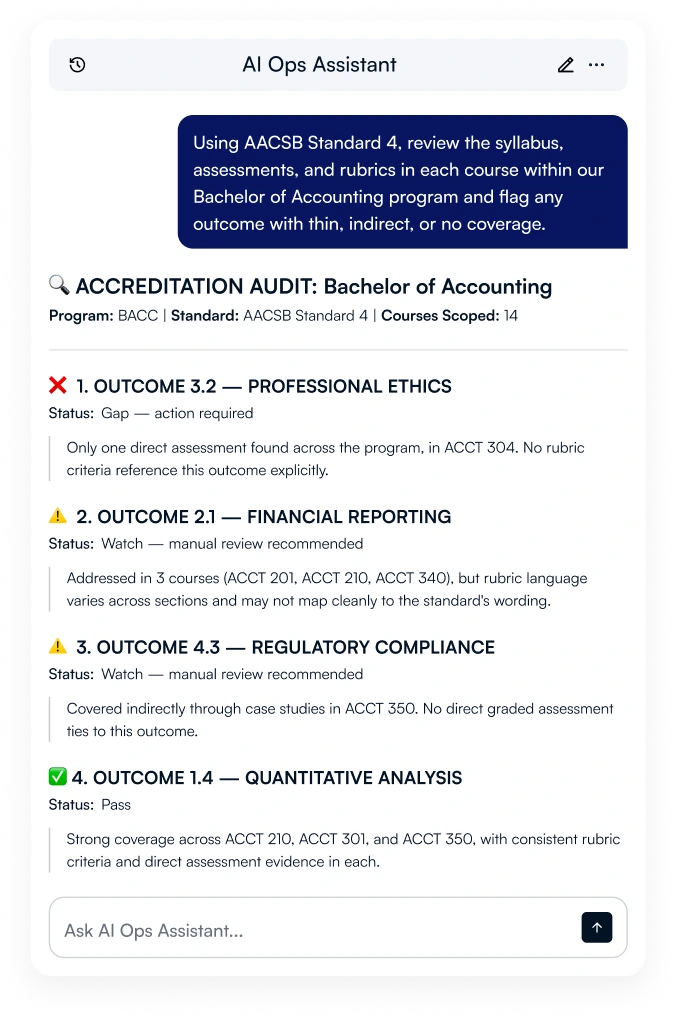
AI Ops Assistant reads syllabus content, assessments, rubrics, and outcome statements across only the courses you scope to the program, in Canvas, Blackboard, Brightspace or Moodle. Upload your accreditation standard once, and the agent maps every course against it in the same conversation. Access stays restricted to the named course list, so the mapping stays reviewable end to end.
From the same conversation, drill into any outcome, ask which course has the weakest evidence, or re-run after a syllabus update. Any report is shown in full before export. The agent never publishes or submits on its own.
Key features
- Learning outcomes stated in each course syllabus
- Assessment briefs and rubric criteria mapped to outcomes
- Assignment and exam alignment with the named accreditation standard
- Coverage gaps: outcomes with thin, indirect, or no evidence
- Consistency of outcome language across sections of the same course
- Combined signals across all named courses in the program
- Scoped strictly to the course list provided for that program
What to ask
Using accreditation standard AACSB Standard 4, review the syllabus, assessments, and rubrics in each course of the Business Program and tell me which program learning outcomes are covered, where they're covered, and how strong the evidence is. Flag any outcome with thin, indirect, or no coverage.
Map our program learning outcomes against AACSB Standard 4 across all 14 courses. Show me which courses address each outcome and how strongly.
Which of our courses has the weakest evidence for outcome 3.2, professional ethics? Show me the assignments and rubric criteria you found."
Compile everything we've mapped into an evidence report formatted for our accreditation submission. Flag any outcome below 70 percent coverage.
Human approval on every write action. Every interaction logged.
Ready to get started?
Book a 30-minute walkthrough. We will run a real audit on a demo course and show you exactly what your team would see.


.svg)


.webp)
%20(1).webp)
%20(1).webp)