AI in the LMS: How It Works in Canvas, Moodle, Brightspace & Blackboard
Introduction: Making AI Work Inside the LMS
Students don't search your knowledge base. They don't read the FAQ page you spent three weeks updating. They open the LMS, look for an answer, and if they don't find one quickly, they email someone, submit a ticket, or give up.
That's the practical problem AI in the LMS is trying to solve: not AI as a concept, but AI that works in the place where students already are, answers questions grounded in what your institution has actually published, and handles the repetitive load that eats into staff and faculty time every term.
This guide covers what AI in an LMS actually means, how it works inside Canvas, Moodle, Brightspace, and Blackboard, and which use cases deliver the clearest return for support, learning, and feedback workflows. It's written for education leaders, digital learning teams, and LMS administrators who are past the "should we use AI?" stage and into the "how do we do this well?" stage.
The context matters, but it's the background, not the starting point. AI adoption in higher education is accelerating: Microsoft's 2025 AI in Education report cites an IDC study in which 86% of education organizations report using generative AI, the highest rate of any industry surveyed. EDUCAUSE's 2025 AI Landscape Study found that 57% of respondents now view AI as a strategic institutional priority, up from 49% the previous year. What those numbers don't capture is the gap between adoption and readiness: many institutions are still building governance frameworks, integration standards, and evaluation processes while usage expands around them.
The LMS is where that gap becomes most visible, and most solvable. It's where students ask questions, where faculty grade, and where institutional controls already exist. Done well, AI embedded in the LMS reduces friction, supports learners in context, and gives institutions a measurable, governable layer of capability they can actually manage.
Why institutions are adding AI to the LMS
Most campuses aren’t integrating AI into the LMS because it’s trendy, they’re doing it because it addresses structural constraints the LMS already sits at the center of:
- Students expect real-time answers and support. The LMS is the place where “point-of-need” questions happen (assignment requirements, deadlines, course policies, learning resources). AI embedded in the LMS can reduce friction by meeting learners in context, rather than sending them to separate tools or portals.
- Faculty workflows can’t absorb more tool sprawl. If AI requires instructors to leave established grading, feedback, or content workflows, adoption is limited. Embedding AI into existing LMS workflows reduces context-switching and avoids “another login, another dashboard.”
- IT and compliance teams need controllability. Institutionally deployed AI needs identity, role-based access, logging, content boundaries, and predictable integrations. The LMS is already designed around authenticated users, course roles, and structured content, making it a practical anchor point for deploying AI with guardrails.
- Institutions want measurable outcomes, not just experimentation. AI in the LMS can be measured in concrete terms: engagement, time-to-resolution, ticket deflection, changes in student help-seeking behaviors, and workload shifts during peak academic periods.
Growth in AI adoption in higher ed is driving “LMS-first” thinking
When leadership sentiment shifts and usage accelerates, institutions typically move from “tool curiosity” to “platform strategy.” That’s exactly what sector signals suggest is underway:
- Strategic prioritization is rising. EDUCAUSE’s 2025 AI Landscape findings highlight that more institutions are elevating AI to a strategic priority.
- Adoption is widespread across education. Microsoft’s 2025 report underscores how quickly genAI use has expanded in education and points to a steep adoption curve.
This matters for AI in learning management systems because when adoption becomes broad, the main institutional question changes from “Should we allow AI?” to:
“Where do we implement AI so that it’s secure, equitable, supportable, and measurable?”
For many institutions, the LMS is the most defensible answer.
Types of AI in LMS environments (what “AI-powered LMS tools” usually include)
1) AI tutoring and study support inside the LMS
These tools support learning in context, often by helping students interact with course materials, clarify concepts, practice retrieval, and plan study.
Common capabilities of AI in learning management systems include:
- Answering questions using course-aligned resources
- Generating practice quizzes/flashcards from course topics
- Helping students break down complex tasks (“how do I start this assignment?”)
- Guiding study plans and revision schedules
What makes this category powerful in the LMS is context: the system can be aware of course structure, modules, and learning resources, rather than operating like a generic chatbot - achieving full AI LMS integration.
2) AI grading and feedback acceleration
This category focuses on reducing bottlenecks in assessment workflows, especially where instructor workload spikes (early term, midterms, finals).
Common capabilities:
- Drafting feedback aligned to rubric criteria
- Summarizing common issues across submissions
- Flagging missing elements against assignment requirements
- Supporting consistency in tone and structure across feedback
Here, there is an important note we must be aware of: there is a major difference between AI solutions that suggest feedback for instructors to review prior to grading, versus AI that autonomously determine grades. These two models carry very different institutional risk profiles, and touch upon a key point for higher education: the importance of minimizing risk and maintaining governance.
AI feedback tools are available as guides that can support instructors in delivering feedback equity. The attention and energy an instructor might be able to give the first assignment can be different than the twentieth in a single evening. While these tools can help save considerable time while providing the same feedback depth to each assignment, AI grading in the LMS ensures the rubric, materials and evaluation criteria are cohesive and aligned to the assignment in evaluation.
3) AI support and service delivery
This is where AI addresses operational pressure: repetitive questions, fragmented knowledge, and inconsistent service capacity.
Common capabilities of AI support in the LMS include:
- “Where do I find…?” answers tied to institutional knowledge
- Policy/process guidance (deadlines, extensions, support routing)
- Deflecting Tier-1 queries before they become tickets
- Escalating complex issues to humans
When embedded into the LMS, support becomes more efficient because it’s delivered in the same place students already go to complete academic tasks. In these cases, the AI acts as an AI-powered LMS tool that supports students 24/7, acting as a helpdesk for all relevant course content, reviewing deadlines, or checking important exam dates.
The core problem this shift is trying to solve
Even institutions with strong digital teams often struggle with the same pattern:
- Knowledge is fragmented across pages, PDFs, and systems
- Students don’t know where to look (or won’t look)
- Support volume rises, response times lag, and the LMS becomes a pressure point
AI in the LMS is ultimately a response to that reality. Done well, AI LMS integration can reduce friction, support learners in context, and create a more measurable, governable layer of capability across teaching, learning, and support.
How does AI work in the LMS?
When someone asks “How does AI work in Canvas or Brightspace?”, they are usually asking a practical question: Where does the AI get its answers, and how do we keep it trustworthy?
A useful way to explain it is to break it down into four parts: content, context, delivery, and escalation.
Where does the AI get its answers from?
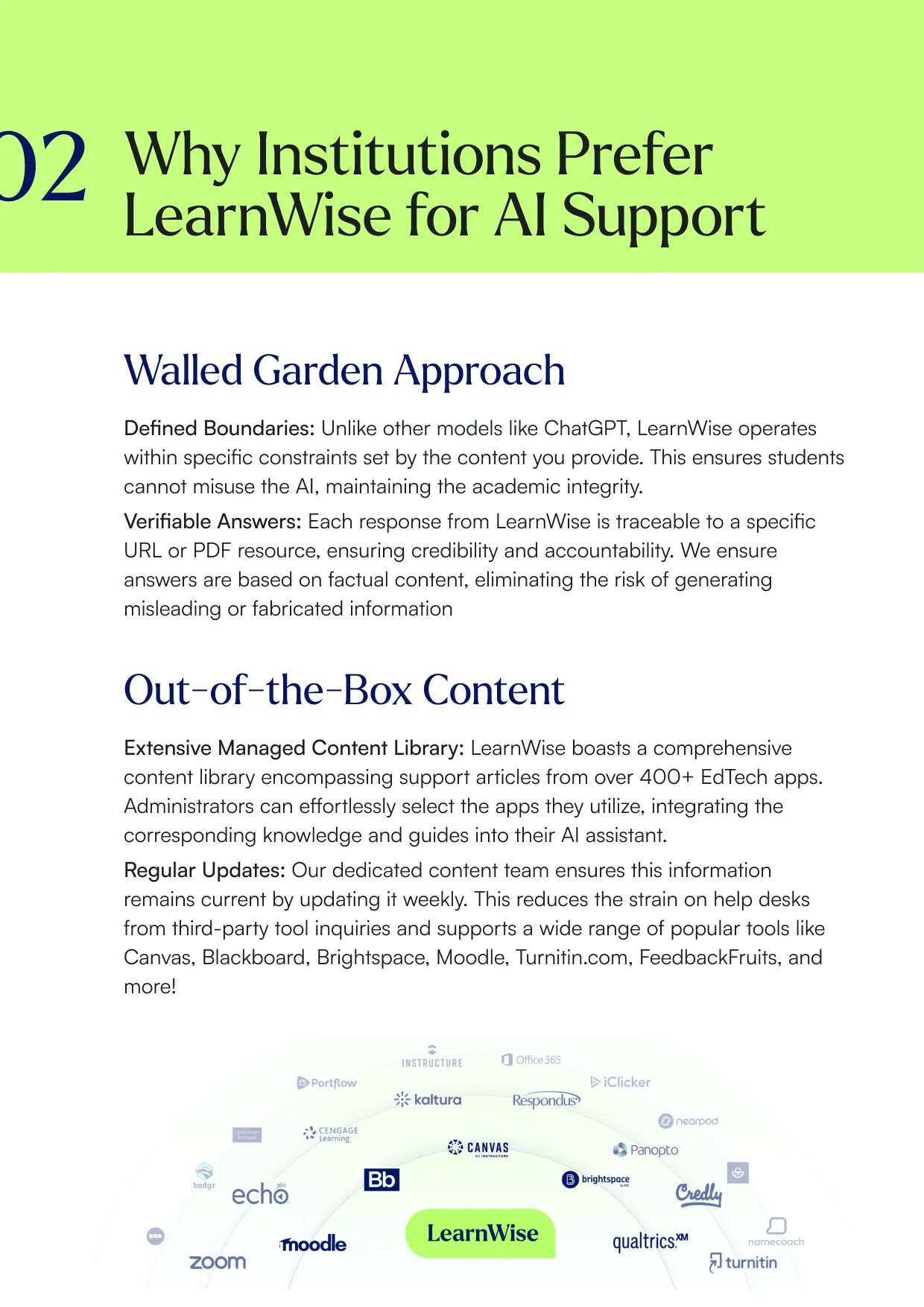
As we’ve seen, it is possible for AI solutions to be designed with a walled-garden approach to data and privacy. These can be designed to deliver responses grounded in an institution’s own content, policies, and course materials.
For AI support tools, responses can include cited and verified answers from institutional knowledge bases. This matters because the source of truth for student support is usually the institution’s own pages, guides, and policies, not a general model’s best guess. This also takes care of the AI hallucination problem: AI hallucinations are confident but false, misleading, or nonsensical outputs generated by artificial intelligence models, particularly Large Language Models (LLMs). These errors occur because AI predicts statistically likely words rather than relying on factual knowledge. Examples include invented citations, fake historical events, and incorrect logical reasoning.
AI Accuracy and the Risk of Hallucination
One of the most common concerns institutions raise when evaluating AI for the LMS is a straightforward one: how do we know the answers are correct?
It's the right question, and it leads directly to the issue of hallucination. In the context of large language models, hallucination refers to outputs that are confident but factually wrong: invented citations, inaccurate policy descriptions, fictional deadlines, plausible-sounding but incorrect guidance. The problem isn't that AI "makes things up" in an obvious way. It's that it can produce incorrect information in a tone that sounds authoritative, which is particularly problematic when students are relying on it for academic decisions.
The reason hallucinations happen is structural: language models are trained to predict statistically likely outputs, not to retrieve verified facts. When a model doesn't have a reliable source for an answer, it generates what fits, rather than acknowledging what it doesn't know.
For institutions, this is not an abstract concern. A student who receives incorrect information about a submission deadline, an extension policy, or a financial aid requirement has received a real-world harm, regardless of which interface delivered it.
How well-designed LMS AI reduces hallucination risk
The most effective mitigation is constraining what the AI is allowed to draw from. Systems that operate from a defined, institution-controlled knowledge base — rather than open-web data or a general model's training — are significantly less likely to hallucinate, because the model is retrieving and referencing specific content rather than generating from pattern alone.
This is often called a retrieval-grounded or walled-garden approach: the AI only answers from sources the institution has reviewed and approved. Every response can be traced back to a source document, which makes answers verifiable and auditable.
Additional safeguards that responsible LMS AI tools should include:
Transparency about sources (students and staff can see where an answer came from), defined out-of-scope behavior (the AI indicates when it cannot find a reliable answer rather than guessing), and regular content review processes so the knowledge base reflects current institutional policy, not last year's handbook.
No AI system eliminates hallucination risk entirely. But a well-governed, retrieval-grounded system reduces it to a manageable level while making errors visible and correctable when they do occur.
How the AI knows what to show to whom
In an LMS, the same question can mean different things depending on the user. A student asking about financial aid needs different information than a staff member who supports it.
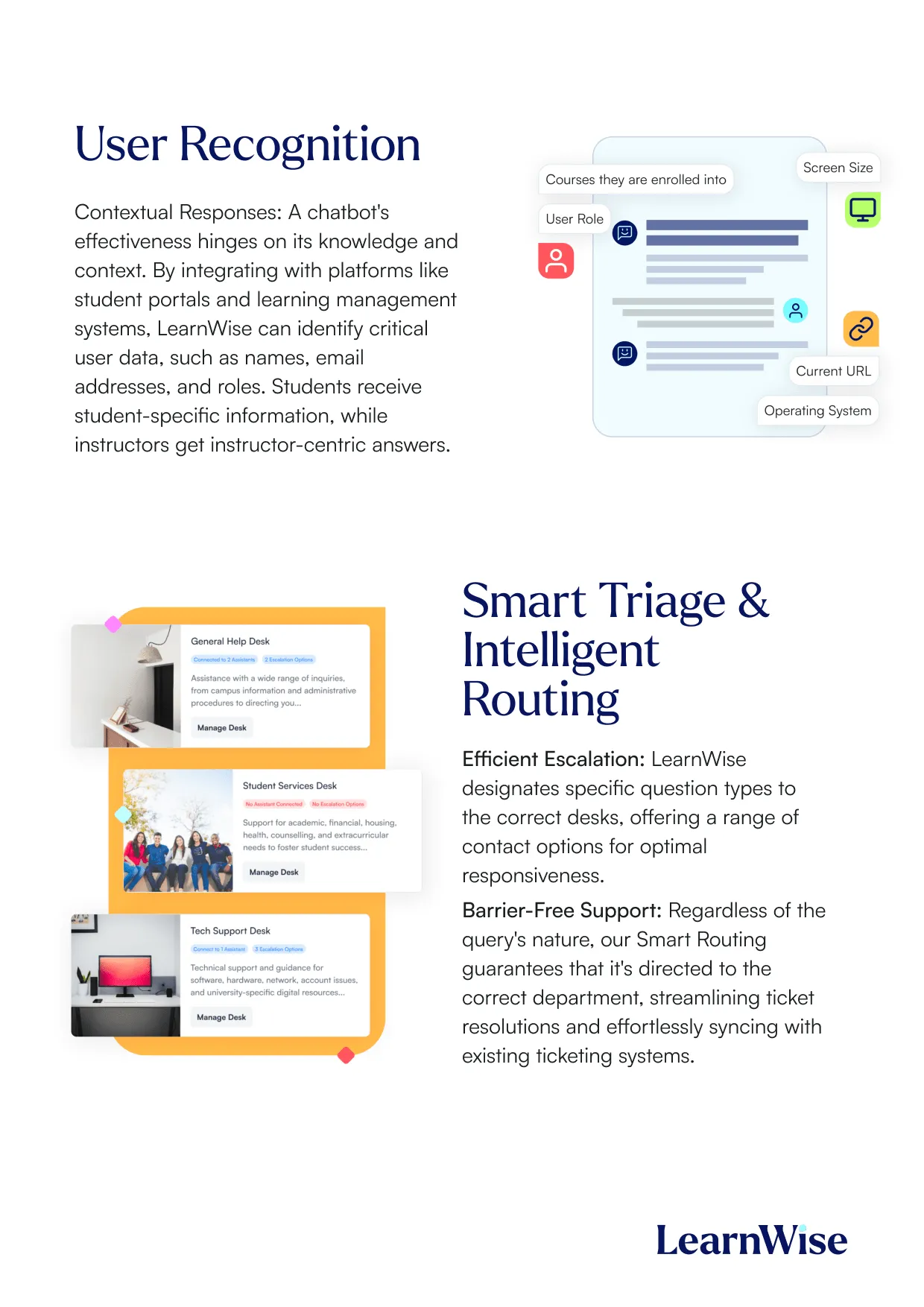
AI can be role aware, which helps tailor responses depending on whether the user is a student, faculty member, or administrator. This reduces confusion and helps keep answers aligned with the right audience, allowing the AI to provide tailored support, such as student-specific guidance on course requirements or faculty-specific help with course management, while maintaining strict privacy controls. The system only accesses necessary details configured by institutional administrators, ensuring that all assistance is both personalized and secure within the institution’s environment.
Where the AI Appears in the LMS
AI support can be made available inside the LMS and also across campus websites, student portals, and content hubs.
This matters because users move between systems. They might start in the LMS, then check a portal, then end up on a website page. A consistent support experience prevents users from getting different answers in different places. AI can be trained on institution-specific materials such as policies, FAQs, and academic guidelines, so every answer is tailored to the institution’s unique context and remains accurate no matter where the user interacts with the AI.
In these cases, AI assistants in the LMS can offer:
- Omni-channel presence: The same AI assistant is available in the LMS, portals, and websites, ensuring users get clear answers as they move between systems.
- Personalized, role-based responses: The AI adapts its support based on whether the user is a student, faculty, or staff, and can escalate complex queries to the right human support team.
- Continuous improvement: Administrators can track usage and refine the assistant using built-in analytics, ensuring the AI evolves with institutional needs.
This approach ensures that support is always relevant, reliable, and aligned with institutional standards.
What happens when the AI should not answer
Some questions are too complex, too specific, or require a human decision. AI in the LMS can support escalation, so complex issues can be routed to the right help desk or support team.
The goal is not to answer everything. The goal is to handle the high volume questions well, then move the rest to the right people quickly.
AI solutions in the LMS are able to follow a clear protocol: The assistant only provides answers based on the information available in its institution-approved knowledge base. If the required information is missing or outside the scope of this knowledge base, the AI will indicate that it cannot answer or may suggest rephrasing the question for clarity or more context. If the query requires human intervention or is too complex, the AI can escalate the conversation to the appropriate help desk or department, often integrating with ticketing systems. This approach ensures that all responses are accurate, policy-aligned, and based strictly on verified institutional content, helping to prevent misinformation and maintain trust in the system.
Laden Sie die Studie herunter


Download the whitepaper

What is AI Tutoring, and how does it work inside the LMS?
When institutions talk about an LMS AI tutor, they’re usually trying to solve two problems at once: students need help in the moment, and faculty can’t provide individualized support across every course, for every student, immediately. The LMS is where tutoring becomes viable at scale because it already contains the context students need help with: the course structure, modules, assignments, and resources that matter to them.
Here is what AI tutoring inside the LMS looks like in practice:
- Course-aware Q&A: Students ask questions about course concepts, readings, lecture materials, or weekly tasks without leaving the LMS.
- Study support and planning: Students generate study plans tied to upcoming deadlines, or create revision schedules that reflect what’s actually happening in the course.
- Practice and retrieval activities: Quizzes, flashcards, fill-in-the-blank activities, and “explain it differently” prompts help students move from passive reading to active learning.
- Navigation support: A major portion of “tutoring” questions in an LMS are really orientation questions (“Where do I find X?” “What do I submit?”). When handled in-context, these reduce friction and keep students moving.
Why the LMS matters: The same tutoring experience outside the LMS can be generic and disconnected. Inside the LMS, the student is already inside the learning journey, so support can be delivered at the point of need, tied to the course environment.
Secondly, and equally important, is institutional control and safety. When integrated in the LMS, these tools provide context: where students struggle most, where there may be knowledge gaps, and what kind of questions are most frequently asked, allowing staff to proactively address these inquiries, helping improve the student experience.
AI Grading & Feedback Automation
Interest in AI tools for instructors is rising because assessment and feedback is where workload for teachers spikes: students want timely, actionable feedback and instructors are under pressure to provide it consistently, often across large cohorts. AI grading in the LMS can feel like letting go of the driver’s seat. In practice, AI grading and feedback tools in the LMS typically mean one of two models:
- Feedback drafting (assistive): AI drafts feedback aligned to assignment criteria or rubrics, and the instructor reviews, edits, and publishes.
- Autonomous grading (high risk): AI assigns grades automatically with minimal or no review.
Most higher ed institutions exploring AI in 2026 prioritize the first model because it improves speed and consistency without removing academic judgment. The LMS is where this works best because feedback and rubrics already live in grading workflows, all set to the instructor preferences and guidelines. In these cases, academic integrity is preserved, and the evaluation process is entirely in the instructor’s control.
Common capabilities of LMS-based grading and feedback automation:
- Rubric-aligned draft feedback that instructors can revise
- Tone and clarity improvements to help feedback land well with students
- Consistency support across markers or across sections of a course
- Pattern spotting (e.g., the same misconception appearing across many submissions)
The implementation principle: The best results come when AI fits into the grading workflow faculty already use, rather than requiring a separate tool, separate uploads, or an entirely new marking process.
AI Student Support Chatbots
An LMS AI chatbot’s main goal is reducing the repetitive questions that flood support channels every term. Students don’t experience the institution as an org chart, but as a series of tasks (“register,” “submit,” “pay,” “access resources,” “get help”). When answers are fragmented across PDFs, portals, and outdated pages, staff become overloaded with frequently asked questions, reducing their ability to help in more complex cases.
When student support chatbots are embedded in the LMS, they work at the moment questions occur: during onboarding, assignment submission, and peak-term transitions.
What these chatbots typically handle well:
- Routine Tier-1 questions: deadlines, policies, how-to guidance, navigation
- Service discovery and routing: where to go for financial aid, wellbeing, disability support, academic integrity guidance
- Institutional knowledge retrieval: drawing answers from approved sources rather than the open web
- Escalation workflows: handing off complex cases to a human team or ticketing system
Why embedding matters: Students are far more likely to use support tools when they’re inside the environment they already rely on. LMS placement reduces “click friction” and captures support demand before it becomes email, tickets, or drop-ins. In this way, AI-powered LMS tools can provide verifiable, institutional support in the environment faculty, students and staff already know and understand.
AI Content Generation for Faculty
The phrase “AI tools for instructors” often signals a very practical need: faculty want to save time on repetitive content creation while maintaining control over what gets delivered to students.
In LMS contexts, AI content generation typically includes:
- Drafting learning materials: outlines, micro-lectures, summaries, explanations at different levels
- Assessment preparation: quiz question generation, discussion prompts, practice sets
- Differentiation and accessibility: rewriting content for clarity, generating examples, adapting explanations for different student readiness levels
- Course administration support: announcements, weekly overviews, instructions for common workflows
The guardrail that matters: Faculty-facing content generation works best when it is clearly positioned as drafting support (not an authority), and when institutions provide guidance on acceptable use, attribution, and academic integrity.
How to keep this aligned with LMS workflows: Make it easy to draft and adapt content where instructors already build their course, rather than forcing an additional system that adds overhead.
AI Analytics & Insights
Once AI is deployed inside the LMS, institutions inevitably ask: Is it actually working? This is where AI analytics and insights become critical, especially for CIOs and digital learning leaders who need to justify investment and governance.
Typical insight categories include:
- Support demand analytics: what students ask most often, where confusion spikes, which questions repeat every term
- Content gap detection: which topics or policies aren’t well explained (because the AI repeatedly can’t find strong answers)
- Engagement indicators: patterns of help-seeking and study behavior (e.g., “students in Module 3 repeatedly ask the same question”)
- Workflow efficiency metrics: reductions in repetitive queries, faster resolution paths, lower ticket escalation volume
- Quality signals: what answers receive negative feedback and need improvement
Why this matters for implementation: Without analytics, institutions can’t separate “interesting” from “impactful.” Insights help teams refine content, improve student guidance, and make AI systems safer over time by catching weak knowledge areas early.
Where AI shows up in Canvas, Moodle, Brightspace, and Blackboard
When people hear “AI in the LMS,” they often picture one generic chatbot. In practice, the LMS matters because it controls two things generic AI cannot: context (which course, which assignment, which role) and workflow (where the user is when they ask for help or give feedback). That’s why the same AI capability can feel completely different depending on whether it’s embedded in Canvas, Moodle, Brightspace, or Blackboard, especially when implementations respect how students and faculty actually use each platform.
In the next chapters, we will discuss each major LMS and their current AI capabilities.
AI in Canvas LMS (Instructure)
Does Canvas Have Built-In AI?
Yes. Canvas increasingly includes native AI capabilities through Instructure’s IgniteAI initiative, which is positioned as a secure, in-context approach to AI inside the Canvas ecosystem. Instructure publicly announced IgniteAI in July 2025 as a major push toward embedded AI experiences across its products.
Canvas AI Tools Available
One of the most concrete examples is IgniteAI Agent for Canvas, described by Instructure as an action-oriented assistant that can complete workflows in Canvas through a single prompt. According to Instructure Community documentation, IgniteAI Agent has been made available to certain segments and regions, with a note on availability windows and potential future pricing.
This is important for institutions because it signals a shift away from “AI as a separate app” toward AI as an embedded workflow layer, closer to the gradebook, course navigation, and admin actions that drive real time savings.
Complementary & Third-Party AI Tools for Canvas
Even with native capabilities expanding, most institutions combine Canvas's built-in AI with third-party tools for specific outcomes: tutoring, feedback acceleration, student support, and analytics. The Canvas ecosystem enables this through standards like LTI and APIs, so "AI in Canvas" often looks like specialized tools embedded inside course pages, assignments, or support areas.
Third-party tools add the most value when they:
- Operate within the course context (materials, assignments, rubrics)
- Respect roles and permissions (student vs instructor vs admin)
- Provide auditability and analytics that campuses can govern (usage logs, content sources, performance)
Common tools institutions use alongside Canvas include:
- Turnitin for AI writing detection and integrity support
- Grammarly for Education for writing assistance
- Panopto Smart Search for AI-powered video indexing
- Microsoft Copilot for productivity and content drafting outside the LMS
The most effective Canvas AI deployments tend to follow a “workflow-first” principle: AI should appear where the workload already exists, not as yet another tool to adopt.
Two high-value placements consistently show up:
- Inside the LMS for support + context
Students can ask questions regarding specific campus policy, opening hours, and class locations, for example, making the AI context-aware to the specific institution environment. - Inside course spaces for learning + navigation (student-facing AI tutoring)
Students ask questions about course content, find resources faster, and get help planning study, all without leaving the course context. This reduces both learning friction and routine “where do I find…” support demand. - Inside grading workflows for feedback (faculty-facing assistance)
The goal is not to automate academic judgment. It’s to reduce repetitive drafting work (rubric-aligned feedback, clearer phrasing, consistency) while keeping instructors in control of final feedback and grades.
Using Canvas and evaluating AI options? LearnWise integrates directly with Canvas via LTI, embedding AI tutoring, student support, and grading assistance inside the course environment your faculty and students already use.
See how LearnWise works with Canvas
AI in Brightspace (D2L)
Does Brightspace have built-in AI?
D2L’s Brightspace has a well-defined AI direction through D2L Lumi, a suite of AI-powered tools designed to enhance teaching, learning, and support within Brightspace.
D2L’s own documentation describes Lumi as a collection of tools that provide intelligent assistance for learners, instructors, and administrators, framed around workflow efficiency, engagement, and content access.
Brightspace AI tools available
The most credible way to understand “native AI in Brightspace” is through D2L’s knowledge-base descriptions. This “About D2L Lumi Pro” article positions Lumi as embedded and role-oriented, intended to automate help, improve engagement, and streamline access to content.
Complementary & Third-Party AI Tools for Brightspace D2L
As Brightspace expands its Lumi capabilities, institutions often evaluate whether additional AI layers are needed for specialized use cases. The key differentiator is whether AI is course-aware and workflow-native, supporting learning and feedback without pulling instructors into separate tools or requiring students to leave Brightspace.
The two practical needs institutions most commonly map AI to are:
- Student learning support in the flow of coursework: deep course-aware tutoring aligned to module structure, and policy-grounded support assistants for institution-wide queries
- Feedback acceleration in grading workflows: rubric-based feedback drafting where time pressure is highest
When extending beyond Lumi, institutions typically look for tools that provide centralized governance (roles, auditability), institutional knowledge grounding, and unified analytics across support and learning interactions.
Common tools deployed alongside Brightspace include:
- Respondus Monitor for assessment integrity
- Kaltura for AI captioning and video analytics
- Perusall for AI-supported social annotation
- Zoom AI summaries for synchronous session recap
These tools support assessment, accessibility, and engagement alongside LMS-embedded AI use cases.
- Using Brightspace and assessing your AI options? LearnWise integrates with Brightspace to add course-aware tutoring, policy-grounded student support, and feedback assistance within your existing Brightspace environment.
Learn more at the LearnWise AI for D2L Brightspace page.
AI in Moodle
Does Moodle Have AI?
Moodle has moved beyond “AI as external plugin only.” MoodleDocs describes an AI subsystem that provides the foundation for integrating AI tools into Moodle LMS and supports multiple model providers via provider plugins.
That’s an important distinction for search intent: Moodle can support AI, but the experience depends heavily on your configuration, governance, and plugin choices.
Moodle AI Tools Available: Plugins
Moodle’s plugin ecosystem already includes AI provider options. For example, the Moodle plugin directory lists AI provider plugins (e.g., a Gemini provider) designed to integrate models into Moodle’s AI subsystem with controls like rate limiting and privacy-focused design.
Complementary & Third-Party AI Tools for Moodle
Moodle's AI success isn't just about which model you pick; it's whether AI is embedded in real workflows faculty already use. Because Moodle is open-source with a flexible plugin architecture, institutions have multiple pathways to implement AI:
- Open-source models hosted in institutional environments
- Provider plugins connecting to commercial models
- Custom placements that control where AI appears (editor tools, activity creation, support)
The benefit is flexibility; the trade-off is that governance and operational burden can shift to the institution if the architecture isn't planned carefully. When planning AI expansion, teams typically focus on:
- Centralizing provider control and standardizing placements across departments
- Aligning logs and retention policies
- Avoiding fragmented plugin deployment
Common tools deployed alongside Moodle's LMS-embedded AI include:
- H5P AI content generation plugins
- BigBlueButton AI transcription tools
- SafeAssign-style plagiarism tools
- AI-powered accessibility checkers
Running Moodle and exploring AI? LearnWise integrates with Moodle via plugin, LTI, or API, giving institutions a governed AI layer for tutoring, support, and feedback without disrupting existing course structures.
See how LearnWise works with Moodle
AI in Blackboard (Anthology)
Does Blackboard Have AI?
Blackboard has added built-in AI capabilities, most notably through Anthology’s AI Design Assistant, which is designed to help instructors and instructional designers build courses and assessments more efficiently. Anthology has positioned this as part of a broader set of AI-enabled innovations across Blackboard (including instructional design acceleration and workflow support).
Blackboard AI Tools Available
Blackboard’s AI capabilities are best understood through the tools Anthology documents as part of its AI Design Assistant experience. The AI Design Assistant is described as helping educators build course content with adjustable complexity and customization at multiple steps.
From an administrator perspective, Anthology’s AI Design Assistant is framed as an instructor efficiency tool, a result of Anthology’s partnership with Microsoft.
Separately, Anthology’s 2025 Blackboard announcement describes a “sweeping set of innovations” intended to streamline instructional design and support student success, reinforcing the direction of travel: native AI in Blackboard is being built around course design, content alignment, and instructor workload reduction.
For many Blackboard institutions, the practical AI question is: what can we do natively vs. what do we integrate? Blackboard environments often prioritize stability, scale, and enterprise governance so integrations typically focus on:
- Course-aware tutoring support
- Feedback/assessment workflow assistance
- Student support and knowledge grounding
- Analytics that connect learning, support, and engagement signals
Complementary & Third-Party AI Tools for Blackboard
AI in Blackboard typically shows up in three embedded places: within courses for student learning support, within assessment and feedback workflows for instructors, and within support surfaces for policy and service Q&A. The point isn't to "add AI" - it's to add AI in ways that respect Blackboard's strengths: stability, governance expectations, and structured workflows.
The strongest Blackboard AI strategies follow a workflow-first approach, starting with the highest-friction moments:
- Course design acceleration: Use built-in tools like AI Design Assistant where it supports instructor productivity inside Blackboard
- Student learning support in-course: Embed AI tutoring inside course spaces where context is available, so students aren't pulled out of the LMS
- Feedback acceleration in grading workflows: Prioritize AI that sits inside marking workflows and preserves instructor control
- Student and staff support for policy + process Q&A — Deploy AI support surfaces inside Blackboard to reduce repetitive questions and route complex cases to humans
Regardless of whether AI is native or integrated, the common success factor is governance discipline. Institutions need clear answers on:
- Role-aware access (student vs faculty vs staff)
- Auditable interactions and administrative controls
- Institution-controlled knowledge boundaries
- Measurable outcomes (adoption, deflection, time saved)
Running Blackboard and planning your AI strategy? LearnWise embeds directly into Blackboard courses and support surfaces, with role-aware responses, institution-controlled knowledge, and auditability built in from the start.
Explore the LearnWise AI Blackboard Integration for more.
Laden Sie das Whitepaper herunter
Download our study


The Best AI Use Cases in the LMS
Most institutions do not need “AI everywhere.” They need AI in a few high-impact places where it reduces workload, improves the student experience, and stays governable. The simplest way to choose the right LMS AI use cases is to start with outcomes, because “AI in the LMS” is not one thing. It shows up differently depending on whether the goal is student support, learning engagement, or feedback at scale.
A useful lens is also context + workflow:
- Context: which course, which assignment, which user role
- Workflow: where the user is in the LMS when they ask for help, study, or give feedback
When AI is embedded in those contexts and workflows, it becomes practical and adoptable. When it lives outside the LMS, it often becomes “one more tool” that students and faculty must remember to use.
Accessing student support inside the LMS
In practice, LMS-based student support tools are most valuable when they handle:
- High-volume questions that repeat every term (enrolment steps, deadlines, eligibility, extensions, forms, IT basics)
- Basic navigation questions that derail students mid-task (“Where do I submit?” “Where is the rubric?”)
- Service discovery and routing (“Who do I contact?” “Which office handles this?”)
When choosing an AI agent and support vendor, make sure to vet the following features:
- Answers grounded in institution-controlled knowledge (not open web)
- Clear escalation paths (“contact support” / “submit a ticket” / “talk to a person”)
- Role-aware responses (student vs instructor vs staff)
- Analytics that surface what people are asking and where content is unclear
These product features ensure the right support reaches the right person, always. Combined, they help institutions map their knowledge management, maintain an updated FAQ, and outline a clear path forward from the moment a student asks a question to ticket resolution.
Improving course learning and engagement for students inside the LMS
This is the “LMS AI tutor” category. Students often do not need more content, they need help working with the content they already have. That is why tutoring use cases are strongest when they stay inside the course context, where the AI can support learning without breaking flow.
Common tutoring-in-LMS use cases include:
- Instant answers about course materials (concept clarification, definitions, explanations)
- Personalized study plans based on course deadlines and pacing
- Practice activities that improve retrieval and engagement (quizzes, flashcards, fill-in-the-blank, role-play prompts)
- Navigational support that removes friction when course structures vary across modules or instructors
When vetting an AI tutoring solution, look out for the following features in their knowledge management capabilities:
- Course-aware support that stays within the LMS context
- Clear boundaries (what sources are used, what content it is grounded in)
- A study experience that supports learning outcomes, not generic responses
Why it matters: in many courses, the “small” help, such as navigation clarity and study structure, is what keeps students moving forward instead of dropping off.
Delivering faster, higher-quality feedback in existing LMS grading workflows
This is the “AI grading LMS” and “AI feedback tools” category. Instructors face a real tension: students want more feedback, but time is limited. AI can help, but only if instructors remain in control and the workflow does not become more complicated.
The most practical, institution-friendly model is:
- AI drafts feedback, aligned to expectations or rubrics
- The instructor reviews, edits, and publishes
- The tool supports consistency and clarity without removing academic judgment
Common feedback acceleration use cases include:
- Drafting rubric-aligned feedback statements
- Improving tone and clarity (so feedback is actionable)
- Helping instructors deliver feedback faster during peak periods
When considering an AI feedback tool for your institution, consider whether the following features are included:
- The workflow stays in the grading environment (no extra upload tool)
- Instructors have final decision-making authority
- Outputs are explainable and aligned to course expectations
This use case is not about automating evaluation. It’s about supporting the instructor’s work so students receive feedback that is useful and timely.
How LearnWise AI Works Inside Your LMS
LearnWise is built to embed inside the LMS, not alongside it. The practical difference is significant: when AI lives in the same environment where students study, where faculty grade, and where staff manage courses, it gets used. When it requires a separate login, a different tab, or a file export, adoption stalls.
LearnWise delivers three core capabilities, each of which maps to a distinct LMS workflow: student support, course-level tutoring, and grading assistance. These can be deployed independently or as a consolidated layer, depending on where your institution's biggest friction points sit.
All three are governed through a single admin environment, with institution-controlled knowledge boundaries, role-based access, and usage analytics built in across all integrations.
LearnWise AI in Canvas
Canvas institutions typically deploy LearnWise via LTI, which means it appears inside the Canvas interface without requiring students or faculty to navigate elsewhere. The integration respects Canvas roles (student, instructor, admin) and can be placed within specific courses, across all courses, or at the navigation level.
AI Tutor in Canvas The AI Tutor embeds directly inside Canvas course pages and modules. Students ask questions about course content, generate practice quizzes, build study plans, and get help navigating assignment requirements, all within the course they're already in. The tutor draws from course materials uploaded or linked by the instructor, keeping responses grounded in the actual content of that specific course rather than a generic knowledge base.
AI Campus Support in Canvas The Campus Support assistant is available across the Canvas interface, not just inside individual courses. Students can ask policy questions, find service information, check deadlines, and get routing guidance without leaving Canvas. Responses are grounded in institution-approved content: student handbooks, service guides, FAQs, and policy documents that the institution controls and updates. When a question falls outside the knowledge base or requires human judgment, the assistant escalates via a connected ticketing or help desk workflow.
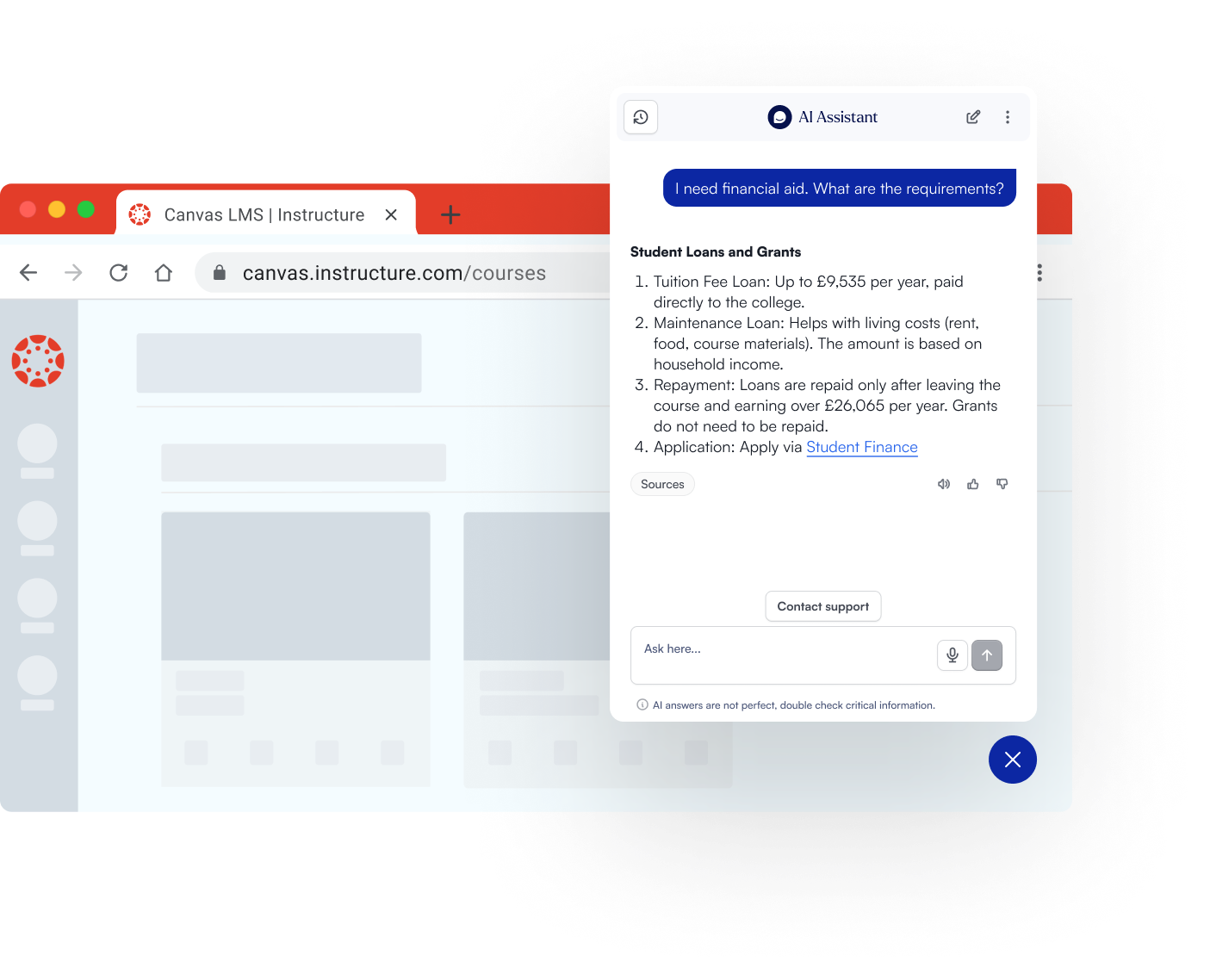
AI Grading and Feedback in Canvas LearnWise surfaces inside Canvas grading workflows, where it drafts rubric-aligned feedback for instructor review. The instructor sees a draft, edits it, and publishes. No file uploads, no external tool, no change to the marking environment. The AI draws from the assignment brief, rubric, and any course-level expectations the instructor has set. Instructors retain full control over what is published.
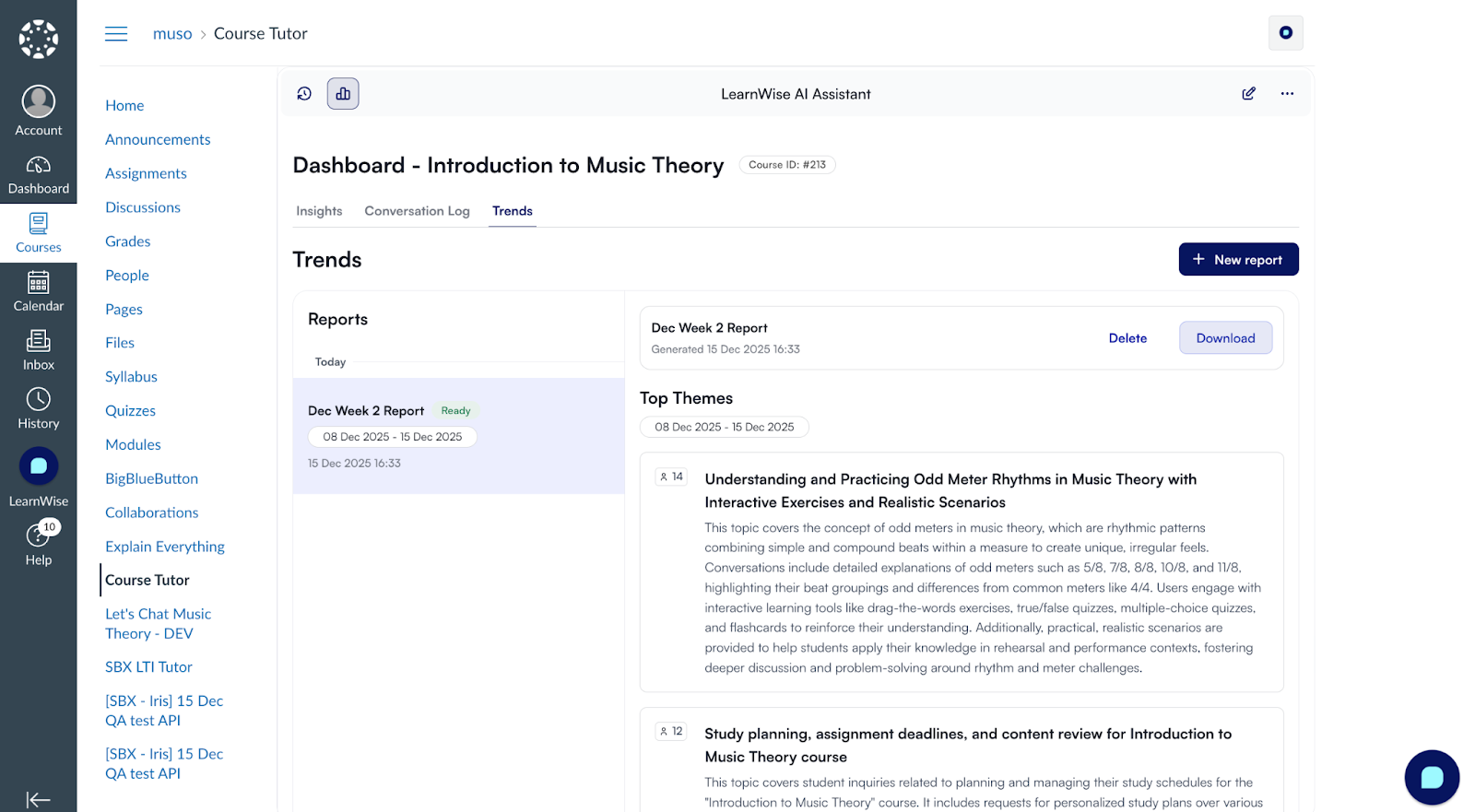
Analytics Institutions can track what students are asking most frequently, where the AI cannot find strong answers (a reliable signal of content gaps), engagement patterns across courses, and grading workflow usage over time.
See how LearnWise works with Canvas →
LearnWise AI in Brightspace (D2L)
LearnWise's integration with Brightspace is built through a formal partnership with D2L, which means the capabilities are designed specifically for how Brightspace is structured and how faculty and students use it day-to-day. The three core tools — Lumi Chat, Lumi Tutor, and Lumi Feedback — are embedded directly in the Brightspace environment, with no need for faculty or students to switch platforms or learn new workflows.
Lumi Chat (AI Campus Support in Brightspace) Lumi Chat delivers always-on support across Brightspace and, critically, across the institution's wider digital ecosystem: student portals, websites, and knowledge hubs. It answers common questions — financial aid processes, assignment submission steps, Brightspace navigation, service contacts — instantly, without human intervention. For support teams, the practical outcome is a significant reduction in incoming ticket volume, with Lumi handling routine requests and escalating only the queries that genuinely require human input. Because it operates across channels, students receive consistent answers regardless of where they ask.
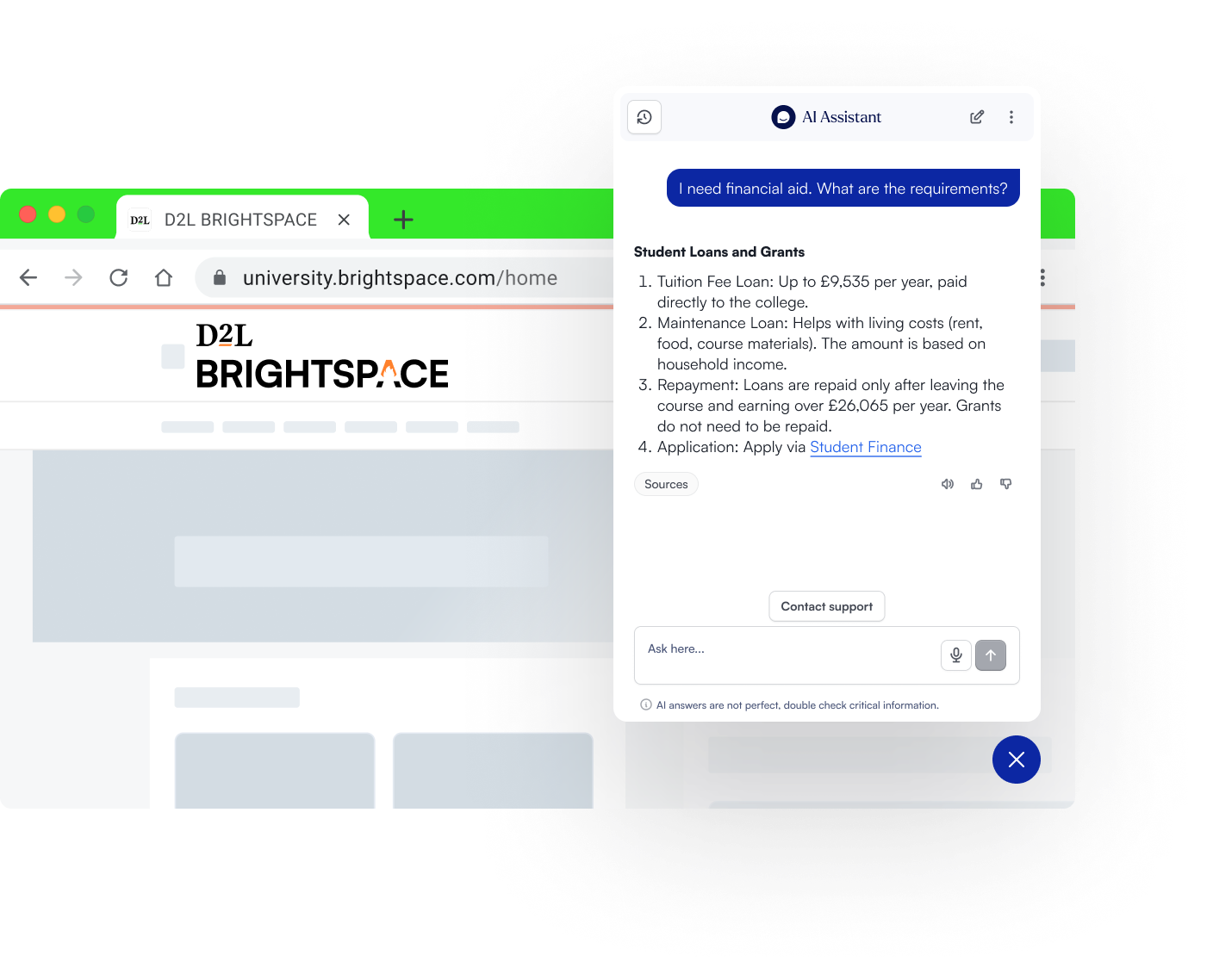
Lumi Tutor (AI Student Tutor in Brightspace) Lumi Tutor provides personalized study support embedded within Brightspace courses. Students get real-time help with course-specific questions — including clarifications on recent discussion boards, upcoming deadlines, and concept explanations — without leaving the course environment. Beyond Q&A, Lumi Tutor generates interactive learning exercises: flashcards, quizzes, role plays, and other retrieval activities that help students move from passive reading to active engagement. Each student's experience adapts to their progress, preferences, and performance, providing a genuinely personalized study experience rather than generic responses.
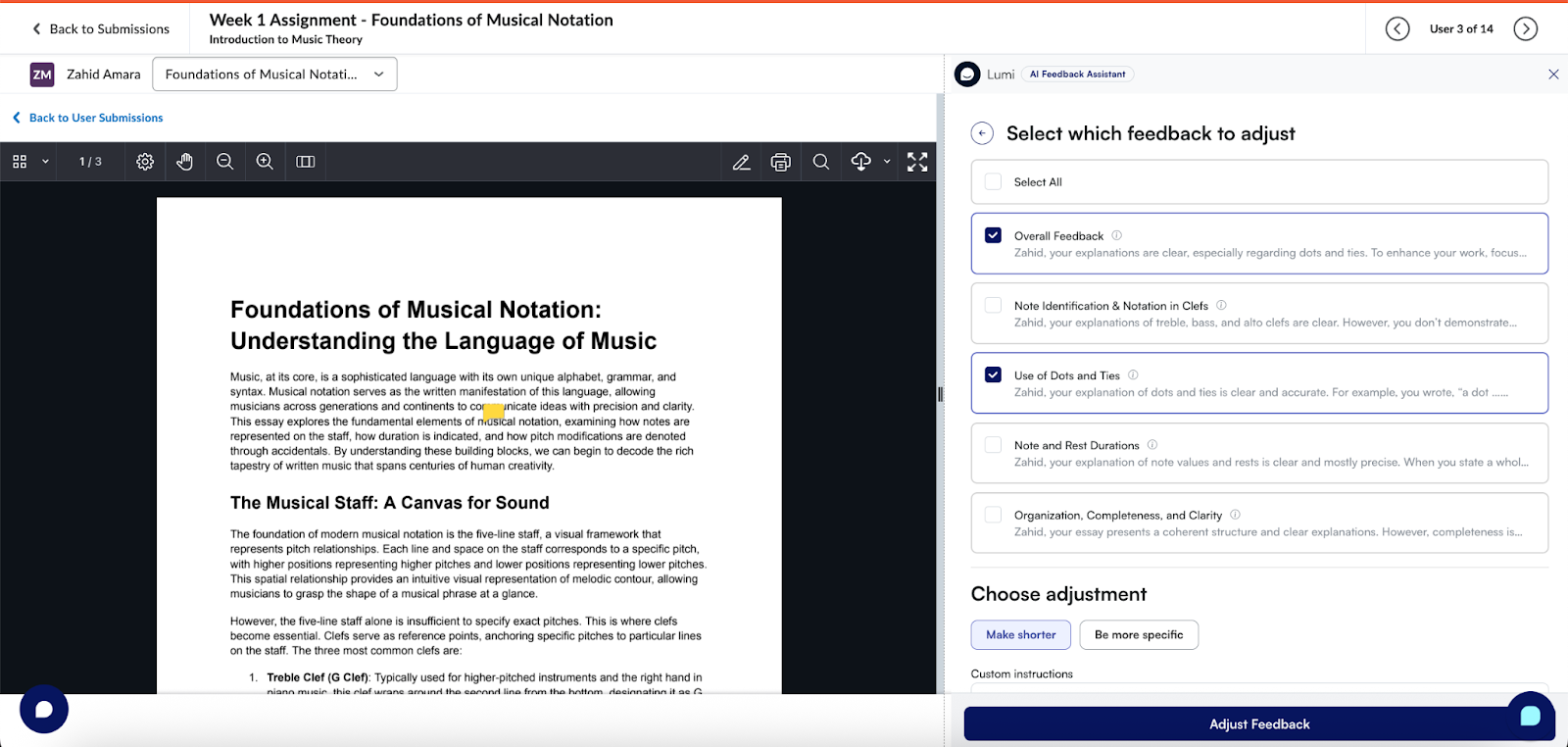
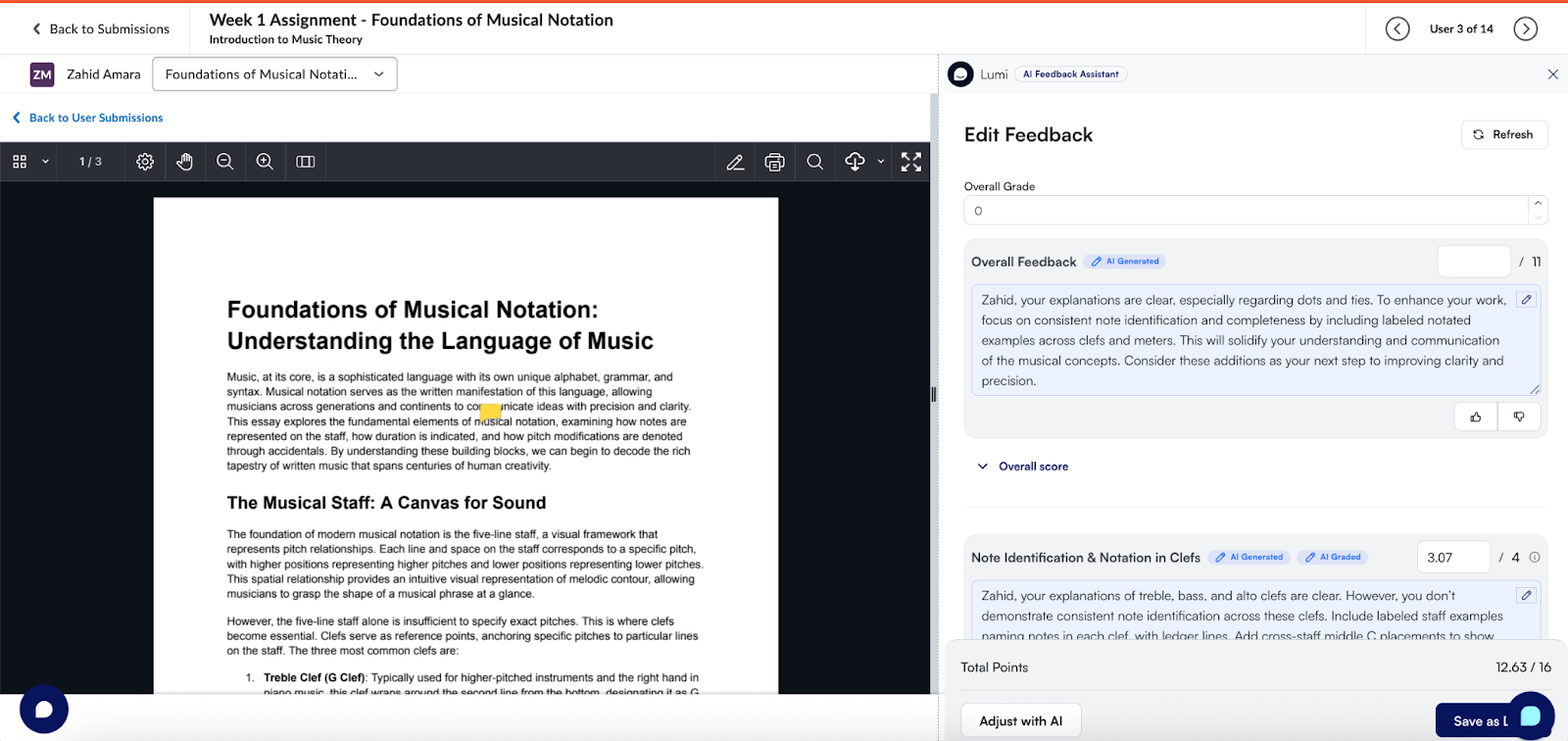
Lumi Feedback (AI Grading and Feedback in Brightspace) Lumi Feedback is built around a core principle: instructors maintain full control, AI reduces the workload. Faculty can annotate, leave comments, or add their own grading prompts, and Lumi Feedback works with that input to generate detailed, contextual draft feedback aligned to rubric criteria. Everything happens within the existing Brightspace grading workflow - no new tools to learn, no submissions to re-upload elsewhere. For large cohorts or high-volume marking periods, this means faster turnaround without sacrificing the quality or consistency of feedback students receive.
Analytics LearnWise provides usage and engagement insights across all three capabilities within Brightspace: which questions students ask most, where knowledge gaps exist in the support content, how students engage with tutoring activities by course, and how grading assistance is used across departments. These insights give institutional leaders the data to report on impact, refine content, and make informed decisions about AI deployment.
See how LearnWise works with Brightspace →
LearnWise AI in Moodle
Moodle's open architecture gives institutions multiple integration pathways: LearnWise can be installed via the Moodle plugin directory, deployed via LTI, or connected through the API. This flexibility means LearnWise can be embedded at the course level, the site level, or both, without disrupting existing Moodle configurations.
AI Tutor in Moodle The AI Tutor appears inside Moodle course spaces as a context-aware study assistant. It works with course materials structured inside Moodle: readings, module pages, assignment briefs, and resources that the instructor has already organized. Students interact with it in the flow of the course rather than being redirected to a third-party tool. Because Moodle course structures vary widely across departments and institutions, the tutor is designed to work with how a course is actually built, not a standardized template.
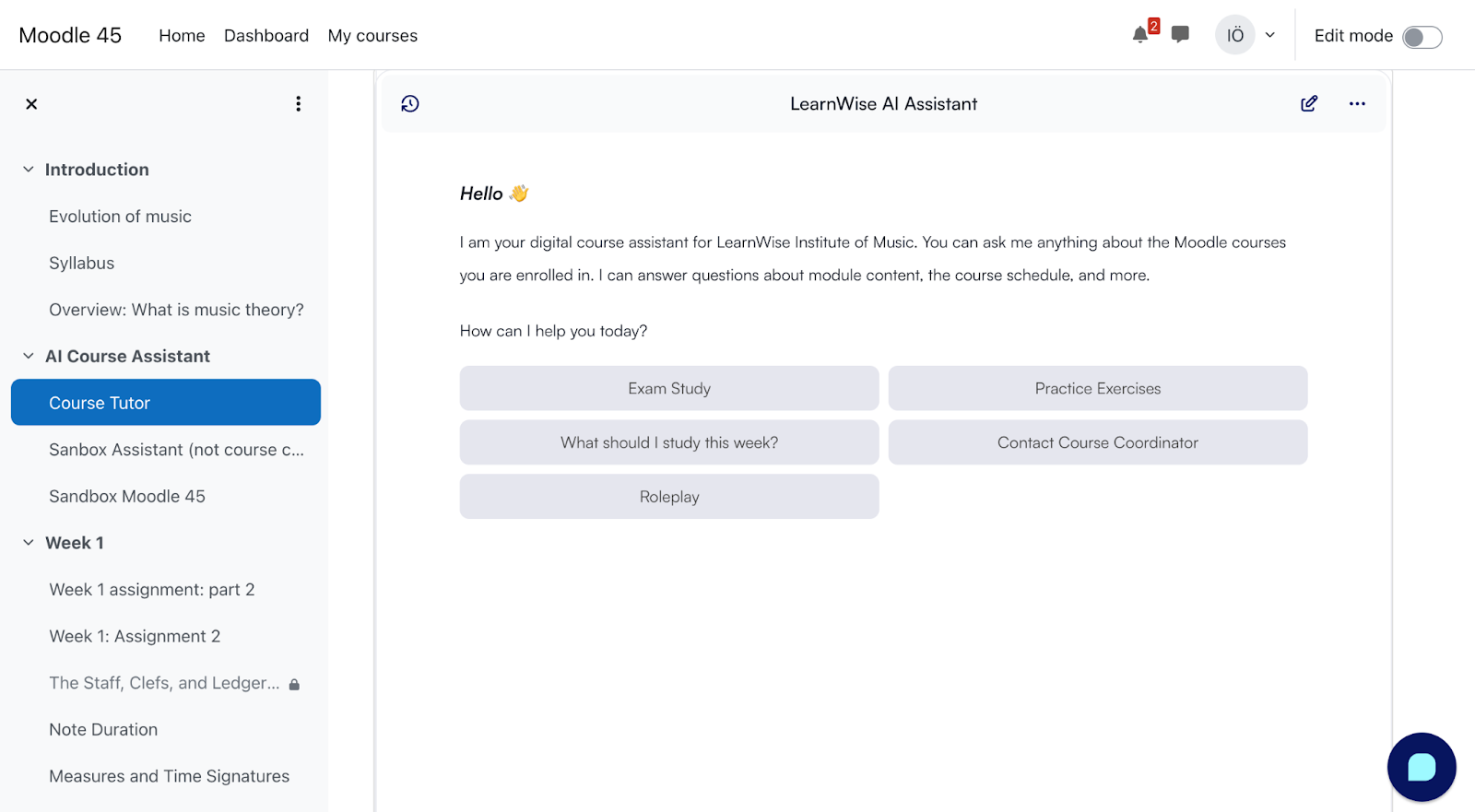
AI Campus Support in Moodle A floating support assistant available across the Moodle interface handles the high-volume questions that repeat every term: deadlines, enrolment, policies, where to submit, who to contact. The knowledge base is maintained by the institution and can be segmented by role, so a student and a faculty member asking similar questions receive responses that are relevant to their context. Escalation paths connect to help desk or ticketing systems already in use.
AI Grading and Feedback in Moodle LearnWise integrates with Moodle's grading environment to surface AI-drafted feedback alongside the marking workflow. Instructors do not need to change where or how they grade. The AI generates draft feedback aligned to the rubric and assignment criteria; the instructor reviews and edits before publishing. Extended integrations are available with tools commonly used in Moodle environments, including Kaltura, Panopto, and SimpleSyllabus.
Analytics Institution-level dashboards surface the most common student questions, which courses generate the most support demand, where content gaps exist in the knowledge base, and grading workflow adoption across departments.
See how LearnWise works with Moodle →
LearnWise AI in Blackboard
Blackboard environments are typically enterprise-scale, which shapes what good AI integration means in practice: it needs to be auditable, role-aware, stable under high load, and administratively controllable. LearnWise is deployed via LTI and platform integration, and is designed to meet Blackboard's governance expectations rather than work around them.
AI Tutor in Blackboard The AI Tutor sits inside Blackboard course spaces, available to students while they are studying, not as an external resource they have to remember to visit. Students can ask questions about course content, get explanations at different levels, generate practice activities, and plan study around upcoming deadlines. The tutor draws from materials within the course, which means responses are specific to what the instructor has actually assigned rather than a generic interpretation of the subject area.
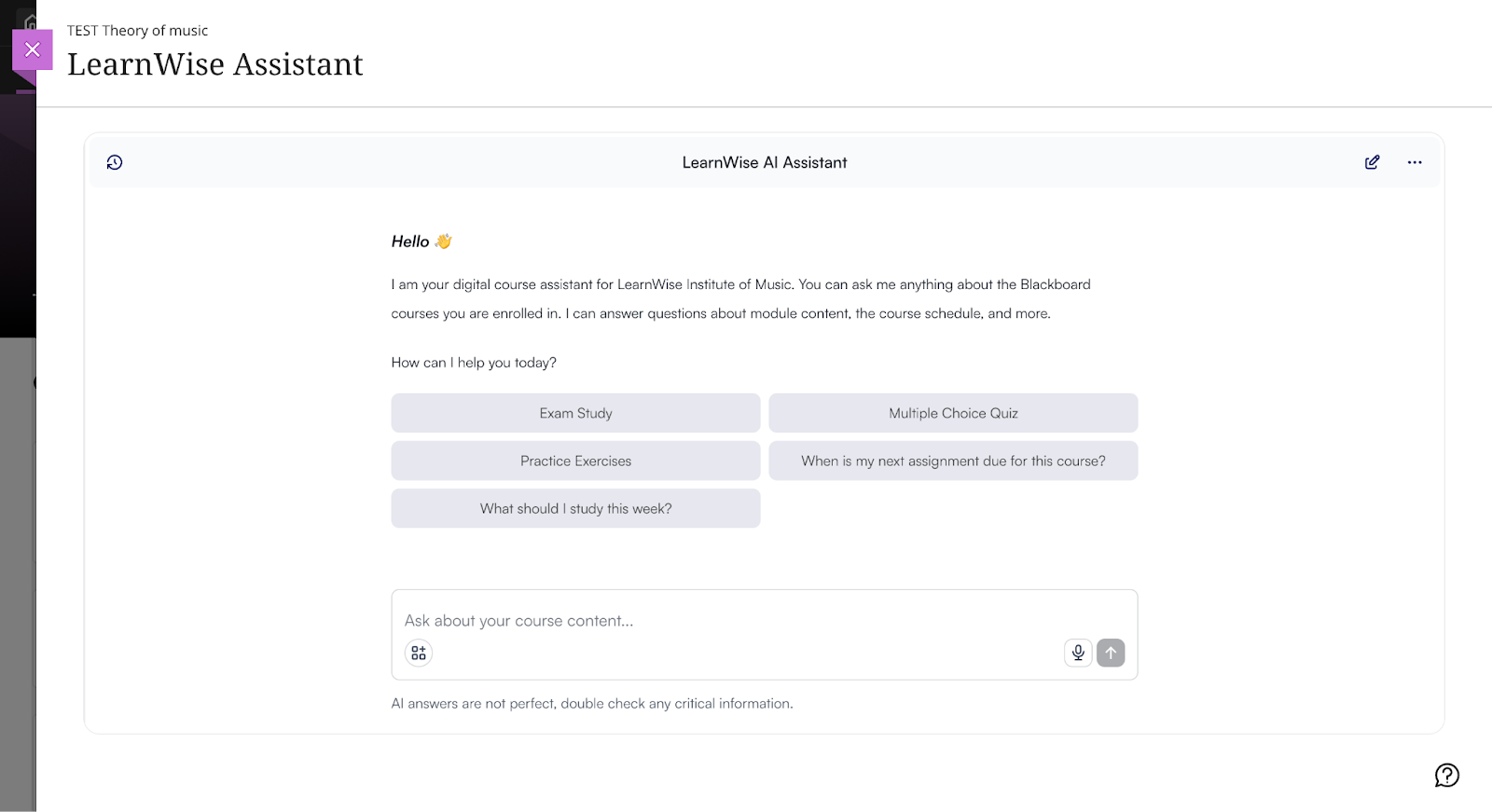
AI Campus Support in Blackboard The Campus Support assistant is available across the Blackboard interface and can also extend to student portals and institutional websites, delivering consistent answers wherever students are. All responses are grounded in institution-approved content, with full admin control over what sources are included and how they are maintained. Complex queries that require human input are escalated through connected workflows, with interaction logs available for audit.
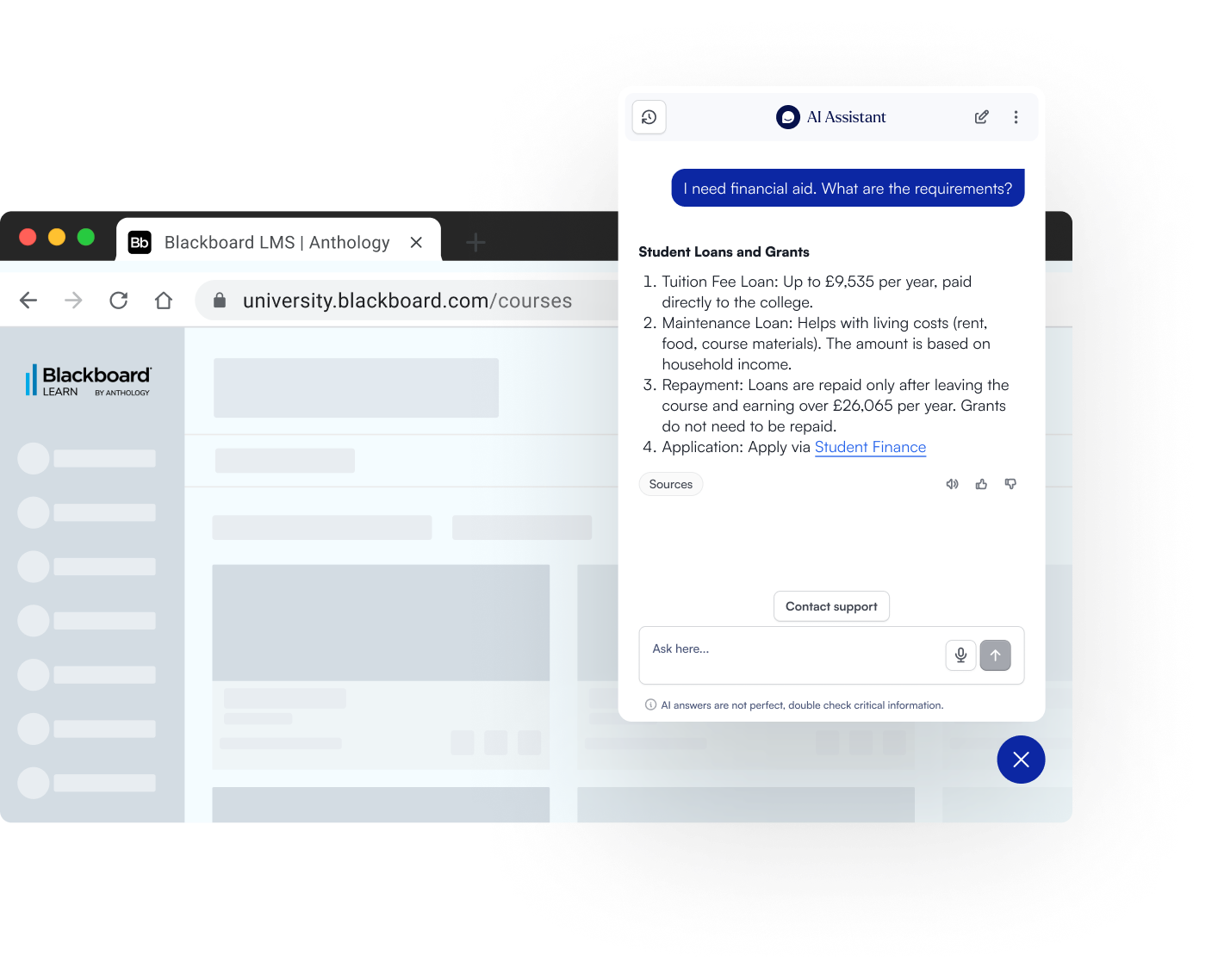
Analytics LearnWise provides usage and quality analytics across all three capabilities: support demand trends, content gap signals, and tutor engagement by course. This gives CIOs and digital learning teams the data they need to report on impact and refine the AI layer over time.
See how LearnWise works with Blackboard →
How to Choose an AI Strategy for Your LMS
Once you’ve mapped what your LMS can do natively (and where it still falls short), the next decision is strategic: what is the right AI architecture for your institution? This isn’t just a tooling question. It determines your governance load, total cost of ownership, adoption outcomes, and whether your AI experience feels coherent across courses, departments, and support channels.
A practical way to frame it:
- Native LMS AI can be a good starting point for lightweight workflows and early experimentation.
- Third-party AI tools often unlock deeper, purpose-built capabilities (tutoring, grading support, institutional knowledge retrieval).
- Dedicated AI platforms can reduce fragmentation by unifying governance, analytics, and multi-channel delivery, especially when you expect to scale beyond one department or use case.
High Level Comparison: LMS Tools and AI Features
Native AI vs Third-Party AI Tools
Most institutions end up using a mix. The question is where each approach makes sense.
Native LMS AI tends to work best when:
- The use case is broad and common (e.g., workflow assistance, basic content drafting support).
- You want to minimize vendor count early on.
- Your institution is still defining governance and wants “small surface area” pilots.
Third-party AI tools tend to be needed when:
- The use case requires deep course context (e.g., course-aware tutoring, rubric-aligned feedback drafting).
- You need AI grounded in institution-controlled knowledge (policies, FAQs, student services content).
- You want specialized outcomes that aren’t always native to LMS roadmaps (or vary by licensing).
The pitfall to avoid: choosing tools based on demos rather than workflow fit. If the AI capability requires people to leave the LMS, upload files elsewhere, or adopt new grading habits, adoption drops, even if the model is impressive.
When making a decision, ask yourself:
“Does this AI need course context and LMS workflow placement to be effective?”
If yes, prioritize LMS-native delivery (either native or embedded via LTI/integration).
Governance & Data Control
For CIOs and procurement teams, the AI strategy lives or dies on governability. Whether you choose native or third-party, you should be able to answer the same questions.
Minimum governance controls to require:
- SSO + RBAC (role-based access: student vs instructor vs staff)
- Audit logs (what was asked, by whom, when, within your compliance constraints)
- Prompt / configuration transparency (who can change behavior and how)
- Knowledge boundaries (what content the AI is allowed to use)
- Escalation rules (when to hand off to humans; how it routes)
Where institutions struggle: adopting tools that are “easy to start” but hard to govern later, because they lack auditability, clear data boundaries, or a consistent admin surface.
When making a decision, ask yourself:
“If a regulator, auditor, or risk committee asked us how this tool makes decisions and what data it uses, could we explain it confidently?”
Faculty Adoption Considerations
Faculty adoption is rarely about AI enthusiasm. It’s about whether the tool respects time, autonomy, and existing practice.
What drives adoption:
- Workflow-native placement (inside the LMS where grading and course interaction already happen)
- Instructor-in-control design (AI suggests; instructor decides)
- Low training overhead (simple mental model; minimal steps)
- Clarity on acceptable use (so instructors don’t feel exposed)
What kills adoption:
- New grading environments or “export/import” steps
- Tools that feel like surveillance or replace judgment
- Unclear policy guidance, especially around assessment integrity
When making a decision, ask yourself:
“Does this tool reduce steps in the workflow, or does it add steps we’ll need to train and support indefinitely?”
Scalability Across Campus
Many AI pilots “work” in one department, and fail at campus scale because governance, support, and measurement weren’t designed to expand.
If you anticipate scaling, you’ll need:
- A standard intake and evaluation pathway (so AI requests don’t become ad hoc)
- A shared risk and readiness checklist (so reviews don’t restart from scratch each time)
- Consistent metrics across tools and departments (so ROI isn’t anecdotal)
- Clear ownership (who maintains knowledge sources, who monitors performance, who signs off changes)
When making a decision, ask yourself:
“If three departments request AI tools next month, can we evaluate them quickly and consistently, or will we stall?”
Multi-Channel AI Beyond the LMS
Even if your strategy is LMS-first, student behavior isn’t. Students ask questions wherever they are: from the LMS course pages to student portals, websites, knowledge bases (SharePoint, FAQs, etc), or the support chat or ticketing system.
If AI only works in one channel, institutions often end up with:
- Duplicated knowledge management
- Inconsistent answers
- Fragmented analytics
- Rising maintenance load
A mature strategy treats the LMS as the anchor, but designs for multi-channel consistency.
When making a decision, ask yourself:
“Can we deliver the same trusted answer across the LMS, website, and portal without maintaining three separate knowledge stacks?”
Implementation Paths
Most institutions fall into one of these three patterns:
Path A: Native-first
- Use native LMS AI capabilities where they meet needs
- Add governance gradually
- Best for early-stage experimentation and limited-scope use
Path B: Best-of-breed extensions
- Add third-party tools for specific outcomes (tutoring, feedback, support)
- Works well when you have strong internal governance capacity
- Risk: fragmented admin, analytics, and user experience if tools multiply
Path C: Dedicated AI platform layer
- Extend the LMS with a platform that consolidates governance, analytics, and delivery across multiple AI use cases
- Often used when institutions want consistency across support + tutoring + feedback and expect to scale
Many institutions extend their LMS with dedicated AI platforms to consolidate governance, analytics, and multi-channel delivery, without turning AI into a patchwork of tools.
A Simple Way to Choose the Right LMS AI Use Case
Most institutions are not choosing between AI and no AI. They are choosing where to start, and how to avoid tool sprawl. A helpful starting point is to ask two practical questions:
Start with the next 8 weeks: where is the biggest friction point?
- If the answer is student inquiries and service load, start with LMS student support (AI chatbot/helpdesk).
- If the answer is students struggling to engage with course materials, start with an LMS AI tutor.
- If the answer is grading backlog and feedback delays, start with AI feedback drafting inside grading workflows.
Check product fit: does the use case depend on context or policy?
- If the use case depends on course context, the LMS is the right place for it. That’s why tutoring and feedback use cases are strongest when they live in the LMS.
- If the use case depends on institutional policy and consistent answers, make sure it is grounded in institution-controlled content. That’s why support use cases work best when content is verified and governed.
This approach keeps the rollout pragmatic, reduces risk, and makes it easier to measure impact early.
What to Look for in an LMS AI Approach
Many institutions see AI demos that look impressive, but the day-to-day reality is different. In practice, these factors tend to matter most:
Control over institutional knowledge
Institutions need clarity on where answers come from and how content is managed. If the institution cannot control the source material, it cannot control the outcome.
Policy-aligned, role-aware responses
Students, faculty, and staff do not need the same answers. Systems should recognize roles and respond accordingly, including when and how to escalate.
LMS-native delivery (workflow fit)
If AI is not where people already work, it becomes a separate tool to adopt and maintain. LMS-native delivery reduces context-switching and improves adoption, especially for tutoring and feedback.
Avoiding tool sprawl
Many institutions start with one AI use case and then expand. If each use case requires a new vendor, a new integration, and a new governance review, complexity grows quickly. A cohesive approach reduces duplicated reviews, inconsistent experiences, and fragmented analytics.
The Future of AI in Learning Management Systems
The last two years have made one thing clear: AI in the LMS is shifting from “add-on chatbot” to “operational layer.” LMS vendors are investing in native AI suites and agent-like capabilities, while open platforms are building core AI frameworks that allow institutions to plug in the model providers they trust.
What’s next is less about novelty (new models) and more about how AI gets embedded into institutional workflows with governance, measurement, and integration discipline becoming the real differentiators.
AI agents in the LMS
The most important shift is from AI that answers to AI that can act.
Instructure’s IgniteAI Agent, for example, is positioned as an “action-oriented assistant” designed to complete multi-step workflows across Canvas using a single prompt, and for admins, it leverages hundreds of Canvas APIs to automate time-consuming system tasks.
In practical terms, “AI agents in the LMS” will increasingly mean:
- Workflow automation (bulk actions, setup/configuration, course management steps)
- Guided task completion (the LMS becomes a place where you “ask and do,” not just “click and search”)
- Handoffs to other tools (the agent coordinates tasks across integrated systems)
What institutions should watch: agentic capability raises the stakes on permissions, auditing, and safe boundaries. As tools become more “actionable,” RBAC, approval flows, and logging become non-negotiable.
Proactive student intervention
AI will move from reactive help (“answer my question”) to proactive support (“you might be stuck - here’s what to do next”), based on early signals like:
- Missed submissions or low engagement patterns
- Repeated help requests around a specific concept or assignment
- Common friction points in course navigation
EDUCAUSE’s 2025 Horizon report underscores that AI is reshaping how learning is supported and documented, but emphasizes the need for intentional practice and guardrails as institutions move from experimentation to scaled adoption.
Governance note: proactive intervention requires clarity on what signals can be used, how students are informed, and how bias and overreach are prevented, especially when interventions touch student success pathways.
Personalized course pathways and adaptive support
As AI is embedded into LMS workflows, the next step is not “personalization for personalization’s sake,” but adaptive support tied to progression:
- Suggested study actions when students fall behind
- Tailored practice prompts based on course content and sequencing
- Contextual nudges toward the next best resource
This will likely be driven by a combination of course structure, content availability, and institutional policy. The key question institutions will face is: Does personalization respect curriculum intent and academic integrity, or does it create a parallel “AI curriculum”?
The strongest implementations will keep AI aligned to:
- Course-defined outcomes
- Instructor intent
- Institution-approved materials
AI-powered academic advising that integrates policy & course data
Advising is one of the most promising but most risk-sensitive areas for AI in the LMS ecosystem.
The opportunity is obvious: students need faster clarity on requirements, timelines, and options. The complexity is also obvious: advising touches policy interpretation, exceptions, sensitive data, and equity outcomes.
Over time, institutions will expect AI advising support to:
- Pull from verified policy sources (catalogues, program requirements, deadlines)
- Understand program context and course progression
- Route exceptions to humans
- Log decisions and guidance for accountability
In other words: advising AI needs to behave more like a governed institutional service than a general assistant.
Stronger AI governance frameworks embedded into platform decisions and procurement
As more AI becomes “native” to LMS environments, governance can’t live solely in policy documents. It needs to show up in:
- Platform configuration options
- Procurement requirements (auditability, data boundaries, role awareness)
- Ongoing monitoring (usage, quality, escalation patterns)
A key structural shift is already visible in Moodle’s approach: MoodleDocs describes an AI subsystem designed as the foundation for integrating AI tools into Moodle, supporting multiple providers via plugins, reflecting a model where institutions can choose providers and manage how AI is applied.
Similarly, D2L positions Lumi as a suite of AI tools embedded into Brightspace to streamline workflows and support learning, signaling an ongoing move toward “AI as part of the platform,” not an external add-on.
We expect institutions will treat AI not as a bolt-on feature, but as an operational layer, one that requires governance, measurement, and integration discipline across the learning ecosystem.
Conclusion
Whether you’re using Canvas, Brightspace, Moodle, or Blackboard, the institutional trajectory is converging on the same goal: secure, institution-controlled AI that fits naturally into LMS workflows. That means fewer disconnected tools, clearer governance, and AI support that shows up in the moments that actually matter: when students are learning, when faculty are providing feedback, and when staff are resolving issues at scale.
The most effective LMS AI strategies typically share three traits:
- Workflow fit (AI lives where people already work)
- Institutional control (roles, knowledge boundaries, auditability)
- Measurable outcomes (usage, quality, time saved, service impact)
If you’re assessing what “good” looks like for your LMS environment, you can explore implementation patterns and integration details here:

.svg)




.webp)
%20(1).webp)
%20(1).webp)